Real screens from the Speed Plus 9 manual. Open any image to inspect the details.
01 / Begin the guest stay with the right detailsNEXT-RELEASE PREVIEW
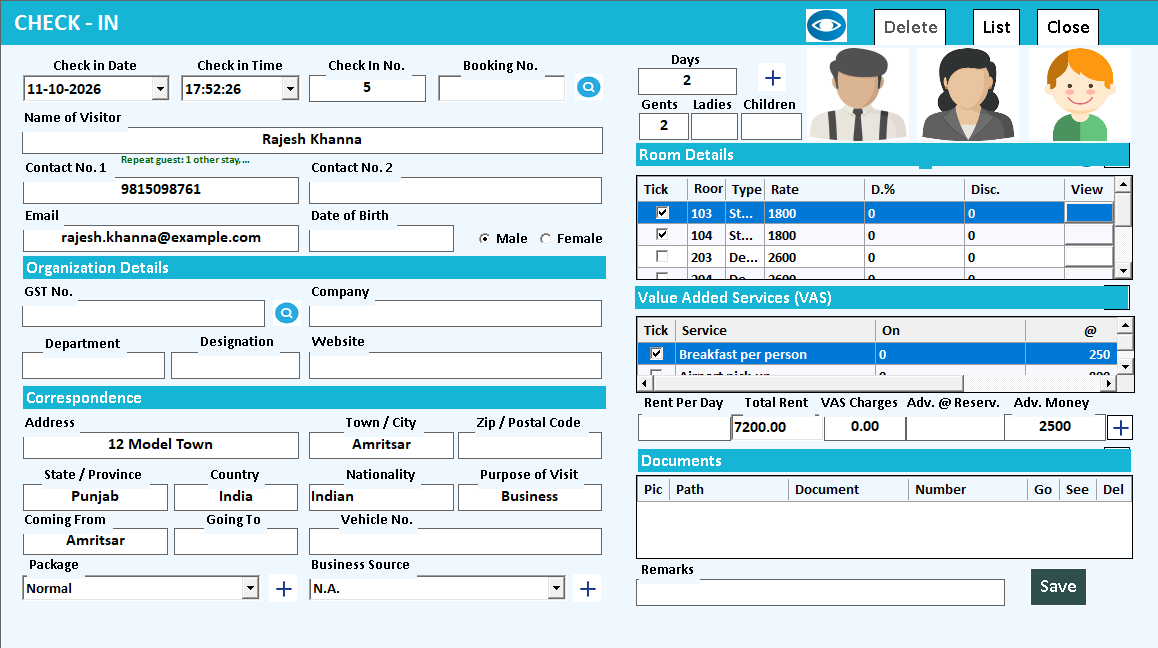
View full size ↗Next-release preview from the 2026 manual. The Check-In screen with the guest filled in: the repeat-guest line under the mobile number, two rooms ticked, a value added service ticked and the advance money. Availability depends on the installed hotel release.
02Review the stay before final settlement+
02 / Review the stay before final settlementNEXT-RELEASE PREVIEW
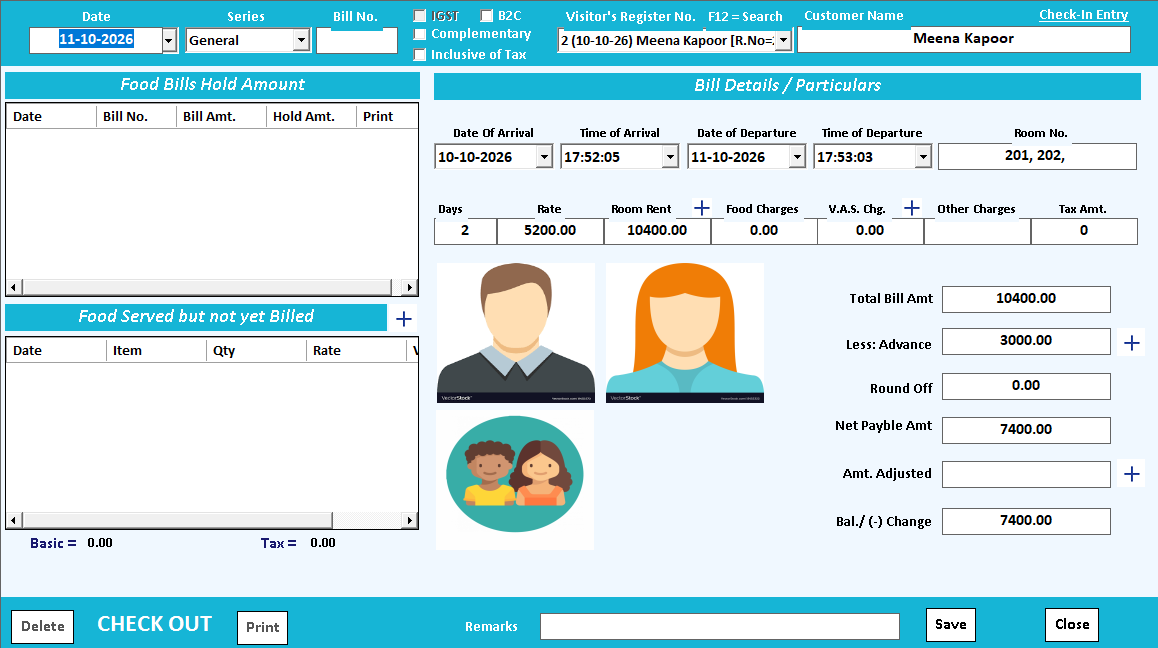
View full size ↗Next-release preview from the 2026 manual. The Check Out screen with a stay picked: the guest, the room, the days, the room rent, the advance and the balance to pay. Availability depends on the installed hotel release.03See the hotel day in one report+
03 / See the hotel day in one reportNEXT-RELEASE PREVIEW
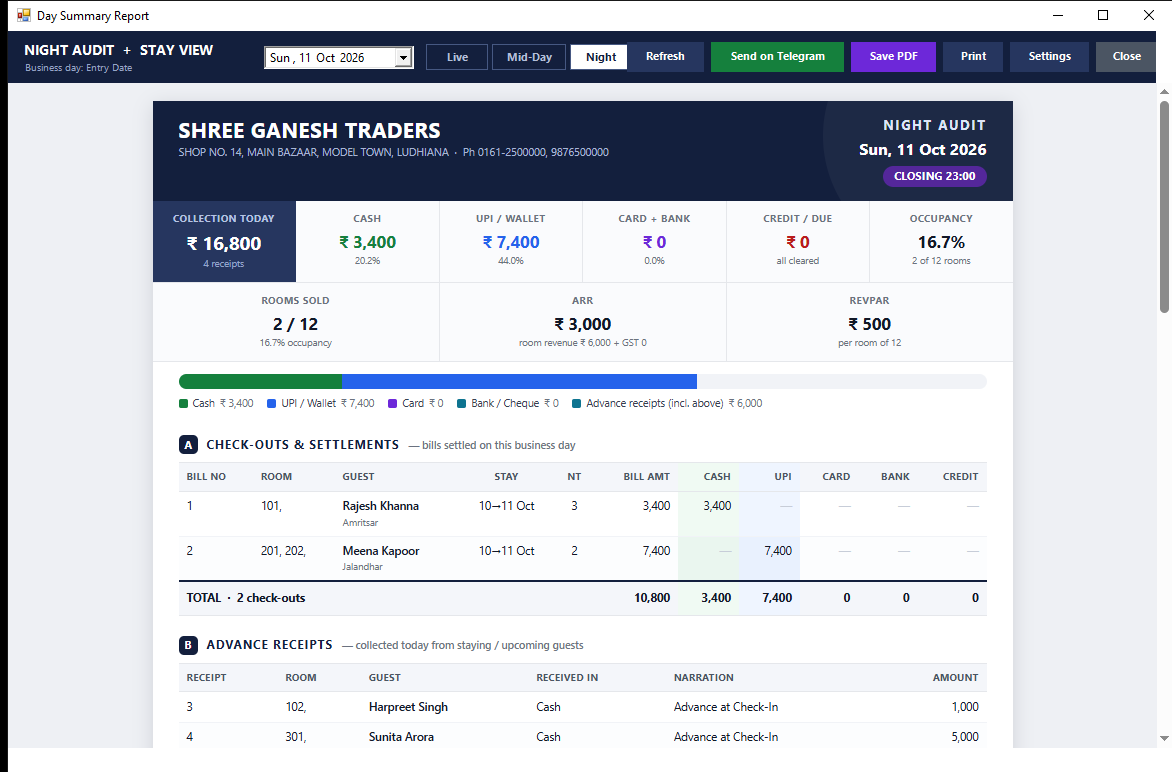
View full size ↗Next-release preview from the 2026 manual. Day Summary in Night view: the toolbar with Live, Mid-Day and Night, the money tiles, the payment split bar, and section A with two check-outs and section B with the advance receipts. Availability depends on the installed hotel release.
UNDERSTAND THE COMPLETE WORKFLOW
A reservation, a stay and a settlement tell different parts of the guest story.
The reservation records the planned visit. Check-in establishes the actual stay and room reference. The bill and settlement explain the charges and payments. Keeping those stages connected helps reception answer a guest’s question without confusing a booking, an occupied room and a paid account.
01
Before arrival
Review guest identity, dates and the selected room. Confirm the availability and booking procedure used by your property. A saved reservation should not be treated as a promise of automatic conflict prevention or booking-channel synchronisation.
02
During the stay
Use the stay reference when recording supported advances and additional services. A clear receipt reference helps the next shift distinguish a promised payment from money already received. Review the configured treatment of room and service charges.
03
At departure
Inspect the charge period, advances and remaining settlement together. Record the actual payment methods and keep the final bill identifiable. Review the day’s checkout and in-house information for handover; check the cut-off used by the selected hotel report.
Why is a hotel advance different from a completed room sale?
The advance records money received before final settlement. The bill records the applicable stay and services. Review their linkage in the configured hotel workflow so the same advance is not collected again or treated as a second sale.
What should I test for cancellations and changed stay dates?
Use a representative booking and demonstrate the supported amendment, cancellation and any refund process. Confirm the resulting room status and accounts entries. These exception paths need a property-specific demonstration before rollout.
A CLOSER LOOK AT THE WORKING
Follow one guest stay through the preview.
Check-in establishes the stay
The preview check-in screen brings guest information, selected rooms, applicable services and advances together. Review the chosen guest and dates before starting the stay. This gives subsequent charges and settlement a common reference.
Checkout explains the balance
The preview checkout screen presents the room, stay duration, rent, advance and balance. Use these fields to explain the amount due to the guest. Demonstrate your property’s room-rate and service rules, including an advance, before choosing the rollout configuration.
Day Summary supports handover
The newer manual’s Day Summary brings money figures, payment split, checkouts and advance receipts into a review screen. Confirm which hotel release supplies this view. Reservation changes, refunds and housekeeping require verification in that same installed build.
From the first reservation to the final settlement, give the front desk a consistent way to find a guest, review a stay and hand work over to the next shift.
Reservations
Keep upcoming stays organised
Record a reservation with guest, room and stay details. Use the reservation list to find a booking when a guest calls or arrives.
Review the selected dates and room details before confirming the booking.
Room dashboard
See the room picture
Use the room dashboard and stay view to review rooms and the guests currently in house. Keep the conversation at reception tied to an identifiable room and stay.
Use your own room types and floors in the demonstration.
Check-in
Start the stay with the right details
Bring guest and stay information into the check-in workflow. Review the room, dates and agreed details together before completing the entry.
Show both an existing reservation and a walk-in during your demo.
Guest records
Find the stay behind the question
Look up guest records, check-in entries and stay details when handling a front-desk enquiry. Give staff a record to refer to during shift handover.
Choose a sample guest and follow the associated stay and bill.
Advance receipts
Keep advances identifiable
Record advance receipts through the hotel workflow and review the related register. Keep the receipt reference available when reviewing the guest’s settlement.
Check how each receipt is linked and presented in your configured setup.
Room and service billing
Review the complete bill
Work with room billing and the hotel’s additional-service entries. Review the charges and configured document format before presenting the bill to the guest.
Bring a representative room invoice and one additional service to the demo.
Checkout and settlement
Finish with a clear payment record
Review the hotel bill and settlement details at checkout. Use the supported payment fields and keep the resulting bill reference available to the front desk.
Demonstrate an advance and a final settlement using your usual payment mix.
Daily hotel reports
Give the next shift the context
Review stay information, advances, settlements and occupancy through the hotel reporting workflow. Keep unresolved guest questions visible to the next responsible person.
Use Night Audit + Stay View for a combined operational review.
HOW IT WORKS
One stay, from reservation to settlement.
01
Reserve: record the guest, stay dates and selected room.
02
Check in: review the arrival and complete the guest’s stay details.
03
During the stay: refer to the room record, advances and additional charges.
04
Check out: review the bill, record settlement and inspect the day’s reports.
01 / BEFORE ARRIVAL
Start reception with the booking in view.
A guest calls to confirm a stay. Find the reservation, check its dates and review the room details with the guest. When they arrive, the front desk has a starting record for the check-in conversation.
Reservation list
Guest and stay details
Room selection
FOLLOW THE WORKFLOWReservationarrivalcheck-in
02 / DURING THE STAY
Give every shift the same reference.
A guest asks about an advance or an additional service. Locate the stay and the relevant entry, then use the documented reference to explain what has been recorded. The incoming shift can continue from that same information.
In-house stay view
Advance receipt register
Additional-service entries
FOLLOW THE WORKFLOWRoomstay recordservice / receipt
03 / AT DEPARTURE
Review the bill before the goodbye.
Bring the room and applicable charges together through the configured billing workflow. Review the advance treatment and final payment with the guest, then retain the bill and settlement references for later enquiries.
Hotel bill
Payment allocation
Settlement reference
FOLLOW THE WORKFLOWBill reviewpaymentsettlement
THE DAILY PICTURE
A daily hotel review with the details behind the totals.
Check-outs & settlements
Review bill, room, guest, stay and the payment-method breakdown in the documented Night Audit + Stay View report.
Advance receipts
Review receipts and their amounts alongside the account and narration recorded for each entry.
Review occupied, booked and vacant room information. The configured report workflow supports PDF output and Telegram delivery.
BUILT AROUND THE PEOPLE DOING THE WORK
A clear role for every member of the team.
Front desk
Reservations, arrivals, guest enquiries and checkout references.
Manager
In-house stays, handover notes and billing exceptions to review.
Owner / accounts
Collections, advances, occupancy and supporting transaction reports.
QUESTIONS BEFORE YOU START
Hotel software FAQs.
Is this a hotel module inside Speed Plus?
This page covers the hotel workflows present in Speed Plus: reservations, check-in, rooms, guest records, hotel bills and related reports. Ask the team to demonstrate the edition and configuration proposed for your property.
Can I review reservations and current guests?
Reservation lists, check-in lists, the room dashboard and stay view are available in the hotel module. Use a sample upcoming booking and an in-house guest to review the information shown in each screen.
How are advance payments handled?
The module includes advance-receipt entry and registers. Ask the team to demonstrate a receipt, its reference to the stay and how it is treated in your final billing workflow.
What is Night Audit + Stay View?
It is a documented combined reporting workflow covering checkout settlements, advances, current stays and occupancy. Ask to see the date basis and included transactions for your property’s daily review.
Can reports reach the owner on the phone?
The documented hotel report integration supports configured Telegram delivery of the report, with PDF output where the required components are available. Review the setup, schedule and connection requirements with the team.
Can hotel and restaurant operations work together?
Speed Plus also contains food-billing and restaurant workflows. Demonstrate your exact room-service or combined-bill requirement with the team, including how charges reach the guest’s bill. Tablio is also available for restaurant operations.
Does this include an OTA channel manager?
This page does not promise channel-manager connectivity or integrations with particular booking platforms. Share your existing booking channels and confirm supported integrations, availability updates and charges before selecting a setup.
What about pricing, installation and training?
Request a quotation based on rooms, users, counters, devices, connected services and training. Include a property-specific demonstration and agree the rollout and support scope before going live.
Bring your room list, room types, a sample guest bill, usual stay rules, payment methods and the reports you review daily. The demo can then follow one representative stay from arrival to settlement.