


Your mandi day,
from arrival to ugrahi.
Red Apple 11 records arrivals, sales, seller bills, crates and collections for fruit and vegetable commission agents. The mobile app and Red Apple Live show the same business on your phone.
- Commission, market fee and bardana worked out for you
- Crates tracked party by party
- Mobile app and Red Apple Live





The mandi day, step by step.
- Arrival enteredLot ready for sale
- Seller bill madeCommission and charges added
- Crates issuedBalance kept party-wise
- Ugrahi collectedOutstanding updated
 Seller bill made
Built for the mandi, not adapted to it.
A typical day runs Arrival, Sale, Seller Bill and Receipts, with crates, bank and journal entries alongside. Each has its own screen and its own reports.
Daily work
Masters and the entries of a mandi day.
Entries
Record the day: arrivals, sales, bills, crates, cash and bank. Entries are where daily work happens.
23 featuresMasters
Set up the people, products and rules your books depend on. Masters are the lists everything else is built from: your…
12 features
Crates
Where every crate is, and who owes you. Track crates by party and by marka: what is receivable, what is issuable…
13 features
Hotel supply
Orders, verification and billing for hotel customers. A separate flow for hotel and bulk-order customers: rate…
12 features
E-commerce & app orders
Products, areas and orders that arrive from the mobile app. Maintain the product catalogue and delivery areas used by…
7 featuresGetting started
From first launch to your first bill. Start here. Learn how the software opens, how the main window is organised, how…
8 featuresReports
Accounts, customers, arrivals, stock and settings.

Accounting reports
Accounts, ledgers, books, interest and outstanding. Financial statements and day-to-day books: Balance Sheet, Profit &…
30 features
Customer reports
Sales analysed by customer, item, day and profit. Everything about what you sold and to whom: customer bills and…
16 features
Arrival reports
Suppliers, lots, seller bills and profitability. Follow every consignment from arrival to final sale: supplier…
13 features
Stock reports
What is in your stores right now. Stock of parties and your own stock, lot-wise, with pendency reports and a register…
7 featuresSettings & tools
Licence, options, templates, tools and maintenance. Registration and renewal, the Options that shape how every screen…
13 featuresMobile app and Red Apple Live
The same business on the phone.

Red Apple Live
Your shop's numbers on the owner's phone, as they happen. Red Apple Live shows the owner today's sale, cash, bills…
13 features
Mandi rates, directory & scanner
Be found by buyers, watch mandi rates, scan handwritten bills. Extra tools inside the app: live Mandi Rates, the…
8 features
Mobile app: getting started
Install, activate, connect to your PC and stay secure. Set up the Red Apple mobile app, choose how it works with your…
5 featuresMobile app: dashboard
Today at a glance, with live rates and quick entries. The home screen of the app: today's totals, quick entry buttons…
3 featuresMobile app: entries
Sales, receipts, payments and crates from your phone. Record business on the move.
6 featuresMobile app: reports
Ledgers, outstanding, registers and crate reports. Check balances and registers from anywhere, and edit or delete an…
11 featuresMobile app: masters
Customers, items and crate types. Customers, items and crate types.
7 featuresThe real screens, not drawings.
Every picture on this website is a capture of Red Apple 11 running on demo data. Click any screen to see it full size.
The Dashboard
The first screen after login. It shows how the business stands today and gives you one-click access to the work of the day.
How it worksArrival
Record goods arriving from a supplier or grower: who sent them, in which vehicle, which items, and how many nug and kg. Every line becomes a lot that you sell later. Arrival is Step 1 of the daily flow.
How it worksSale
Record a sale from your stock to a customer, lot by lot. The software works out commission, market fee, R.D.F., bardana and laga from the item settings and posts everything to the customer's ledger when you save. Sale is Step 2 of the daily flow.
How it worksSeller Bill
Settle with your suppliers. This list shows the lots you have sold on their behalf, how many nug were billed, received and sold, and the Wattak amount, so you know which suppliers are ready for a seller bill. Seller Bill is Step 3 of the daily flow.
How it worksOutstanding Analysis
Who owes you, and whom you owe, as on a date. Send a reminder to the parties on the list by SMS or WhatsApp straight from the report.
How it worksCrates Receivable
Crates that parties still have to return to you, as on a date, by marka, with an estimated cost.
How it worksThe work your team does every day.
Arrival
Record goods arriving from a supplier or grower: who sent them, in which vehicle, which items, and how many nug and kg. Every line becomes a lot that you sell later. Arrival is Step 1 of the daily flow.
- Set the Entry Date, choose the Stock Type (the arrival type from Masters), enter the Vehicle No., pick the Party Name…
- For each item enter Item Name, Lot No / Variety, Nug, Weight [Kg], Rate and Per, then press Enter to add the line.
- Add freight and other charges in the lower grid (Particulars, On Value, @, +/-) and fill Transport, GR/RR No.
Seller Bill
Settle with your suppliers. This list shows the lots you have sold on their behalf, how many nug were billed, received and sold, and the Wattak amount, so you know which suppliers are ready for a seller bill. Seller Bill is Step 3 of the daily flow.
- Choose the From and To dates and press OK.
- Switch between Fresh Sale, Partly Sold, Fully Sold and Bill Book to see lots at each stage.
- Double-click a lot to open its seller bill (next page).
Crates Receivable
Crates that parties still have to return to you, as on a date, by marka, with an estimated cost.
- Narrow by Marka, Area, Group or Accounts Name.
- Estimated Cost values the crates at the cost set in Masters › Crate Marka.
- Receivable means the party holds your crates.
The same business, on your phone.
The mobile app makes entries and reads reports away from the PC. Red Apple Live shows today's business, party ledgers and outstanding as they change.
- Sale, receipt, payment and crate entries from the phone.
- Customer ledger, outstanding and crate balance on the phone.
- Red Apple Live: today's business, bills, crates, arrivals and alerts.
- Mandi rates, a business directory and an AI invoice scanner.
23 videos, one question each.
Short videos from our YouTube channel, shown on the real screen.
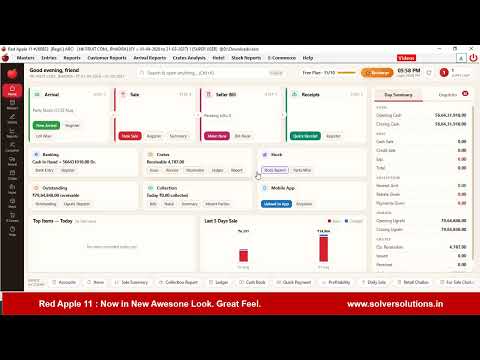
RED APPLE 11.0 — NEW UPDATE IS HERE! Experience a Fresh & Modern Look with the all-new
Asked every week. Answered here.
PC Software aur Mobile App alag alag khareedne padte hain?
Nahin! Red Apple 11 ek complete package hai jisme Mobile App bhi shamil hai aur PC Software bhi. Dono ek hi system ke hisse hain aur real-time sync karte hain. Ek baar khareedne ke baad dono ka full access milta hai.
Kya internet ke baghair bhi kaam karta hai?
Haan! PC Software completely offline kaam karta hai. Mobile App bhi basic billing offline kar sakta hai. Internet hone par dono automatically sync ho jaate hain. Load shedding ya weak network mein bhi kaam jaari rehta hai.
Mandi rates kaise update hote hain?
Red Apple ki dedicated team rozana fresh rates collect karti hai aur app mein update karti hai. App internet se connected ho to automatic update aa jata hai. Aap khud bhi rates update kar sakte hain apni local mandi ke hisaab se — kisi bhi region mein.
Commission aur Arhat ka hisaab kaise karta hai?
Har party ke liye alag arhat percentage set kar sakte hain. Jab bhi sale ya purchase bill banta hai, system automatically commission calculate kar leta hai. Monthly commission report aur party-wise breakdown bhi milti hai. Commission slip print bhi hoti hai.
Kya multiple users ek saath use kar sakte hain?
Haan! PC Software mein multi-user support hai. Aap cashier, manager aur owner ke alag alag roles set kar sakte hain. Har user ke liye alag permissions set hoti hain. Ek hi network par multiple computers par ek saath kaam kar sakte hain.
Training aur support kaise milega?
9+ step-by-step Urdu tutorial videos YouTube par available hain. WhatsApp support bhi available hai. Installation ke waqt free training di jaati hai. Software update hone par naye features ki video bhi upload ki jaati hai.
What is Red Apple LIVE and how do I get it?
Red Apple LIVE connects your PC software to your phone. Every sale, receipt and change on the PC appears on your phone the moment it happens — with a live dashboard, party ledgers, reports, arrivals & stock, crate balances and instant alerts. It works inside the Red Apple mobile app: open the Live tab and sign in with your License No. and the same username & password you use in the PC software.
Is Red Apple LIVE safe? Who can see my business data?
Only you. A company can be added on a phone only with the App Password that you create on your own PC — and that password is one-way encrypted, never stored anywhere in readable form. You can see every phone connected to your firm and remove any of them at any time. And nobody can edit or delete your entries from the phone — if anyone changes anything on the PC, you get an instant alert with the old and new values.
See your own work in Red Apple.
Tell us how your arrivals, sales and crates run today. We show you the same day in Red Apple 11 and on your phone, on a call or at your shop.
Book a free demo
Leave your number. We call back, understand your work and show it on screen.