What is new in Speed Plus 9 in 2026.
Everything added or rebuilt this year, each with its own step-by-step section. Open Help, then Check for Updates in your software to get the latest version.
Getting started
Two Ways to Install
Installation
Installing with SpeedPlusSetup.exe
The setup window has four steps down its left side: Folder, Components, Install and Done.
Installation
The Start-up Screen: Language, Edit and New
Each time Speed Plus starts, the start-up screen shows what it is loading ("Connecting to database…", "Loading masters…"). Then the Language box appears with a Continue button that counts down from 5.
Installation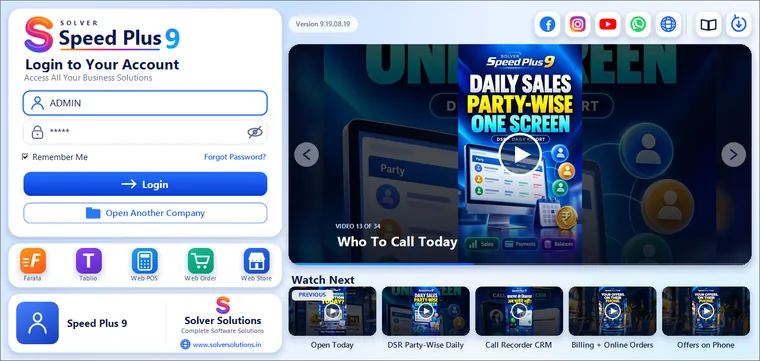
The Login Screen
After you open a company, the login screen asks who is working. The right side is the login card; the left side shows Speed Plus training videos and the partner who installed your software.
Installation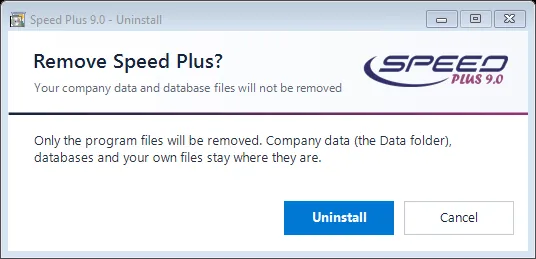
Repair, Update or Remove Speed Plus
Installation
The Select Company Screen
This is the first screen after the language. The header says Select your company. Your companies are on the left under Your companies; the cards on the right act on the chosen company.
Company & users
Creating Your Company: the Seven Cards
Press Create a New Company. The screen Create your company ("Tell us about your business. You can change all of this later.") shows seven numbered cards in three columns.
Company & users
Creating Users (Users Screen)
Right after a new company is created, the Users screen opens ("Create a user, choose what the user can do, and set the limits.").
Company & users New in 2026Owner Controls: Discount Limit, Approver and Bill Profit
The Owner controls tab has two cards. Only the owner can change them; a manager who may open the Users screen sees them read-only.
Company & users New in 2026Item Photos
A photo helps staff pick the right item and is what customers see on your Web Store and Web Order page. There are three ways to add one on the New Item screen.
Items New in 2026Prices That Update From Your Bills
Supplier rates change every few weeks. With Update Item Prices from Vouchers, a saved purchase bill writes its rate into the batch's Purchase P., and a saved sale or POS bill writes its rate into the…
ItemsDaily work
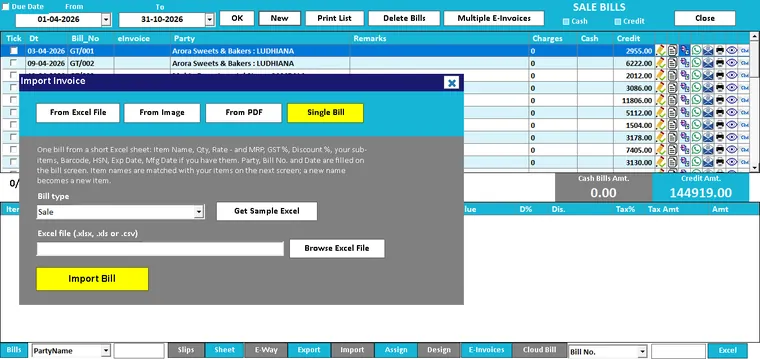
One bill from a short Excel sheet (Single Bill)
A customer sends his order as an Excel sheet. A sister shop sends a list of what it took. Instead of typing it all again, Single Bill reads the sheet and opens the bill filled in.
Sale billing
Invoice Studio: design your own bill, with a page border
Help → Design New Format (Studio) opens Invoice Studio. You tick and type on the left; the bill on the right changes as you go. No designer and no code.
Printing & Invoice Studio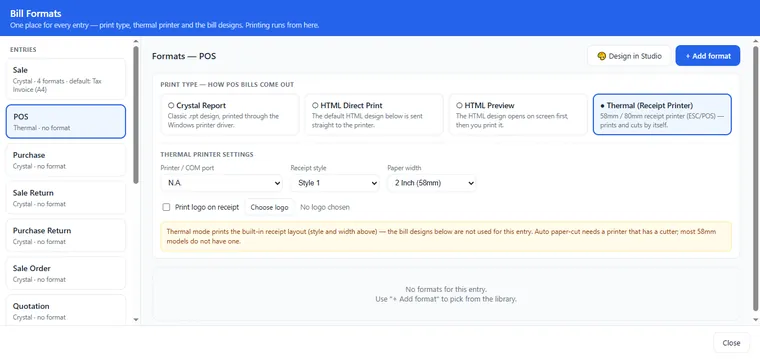
Thermal receipts at the POS: GST summary and a cut after every copy
When the POS entry is set to print type Thermal (Receipt Printer) in Manage Bill Formats, the Point of Sale prints a text slip made for roll printers.
Printing & Invoice Studio New in 2026Print.exe: the right bill every time, and "PDF was not created"
Crystal designs are printed by a small helper program, Print.exe, in the Speed Plus folder. Speed Plus writes the bill, starts Print.exe, and Print.exe prints or makes the PDF.
Printing & Invoice Studio New in 2026GST Summary and its Print Button
The GST Summary puts the whole month on one screen: Total Sale Amount, Total Output GST + Cess, Total Purchase Amount, Total Input GST + Cess, Input Tax Credit (If any) and Balance Tax To be Paid.
GST & e-Invoice New in 2026Update Item Prices from Vouchers
Your purchase price in the item master stays current without opening the item. Click the Settings icon → General Settings → Party and e-way bill → Prices from bills and switch on Update Purchase Price…
Purchase New in 2026AI Photo to Bill
For a supplier who does not use Speed Plus, photograph or scan the paper bill. On the PURCHASE BILLS list click Import, then From Image or From PDF, pick the file, keep Import As on Purchase and click…
Purchase New in 2026Prices That Include Tax: the Incl. Price Box
Some shops bill on a tax-inclusive sale type. The shelf price already has GST in it, but the Price box on POS holds the rate before tax.
POS New in 2026Printing the POS Bill
The Printing card under General Settings → POS print and barcode decides what happens after Save:
POS New in 2026Scan & Go Carts at the Counter
With Scan & Go the customer scans items with their own phone while shopping (Chapter 37). At the counter you pull that phone cart into the POS bill instead of scanning every item again.
POS New in 2026Web Orders Billed on POS
A customer orders through your Web Order link and collects at the shop. On the Web Orders screen press Convert to POS (Chapter 28). The order opens as a POS bill.
POS
Sticker Designs and the Barcode Sticker Studio
Print Barcode Stickers (from Sticker Print) is where you choose the design:
Barcode & labels New in 2026Cost Code on Labels
Your salesman needs to know the cost to bargain safely; your customer should not see it. A cost code word turns the purchase price into letters on the sticker.
Barcode & labelsAccounts and year-end

Ledger and the Show Narration Tick
A ledger is the full story of one account: every bill, receipt, payment and journal with a running balance. Open Reports → Ledger (Ctrl+L), type the party in Account, set From and To, and press OK.
Accounting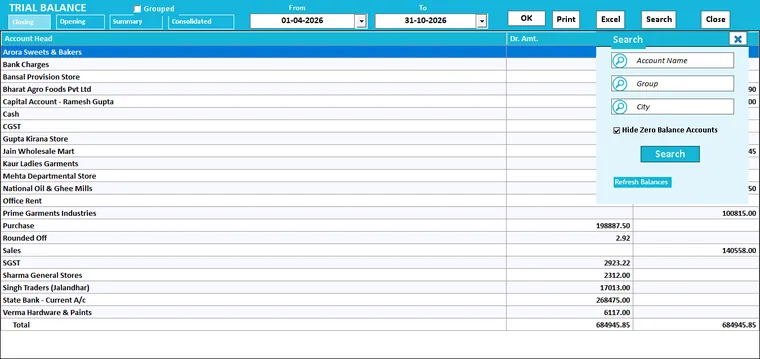
Trial Balance and Refresh Balances
The Trial Balance lists every account with its Dr or Cr balance. Because every entry has two equal sides, the Dr total and the Cr total must be the same.
Accounting
Daily Sale Statement and DSR Party Wise
Two reports under Sale Reports answer "how did today go?".
Accounting New in 2026Date Keys W K M H Y R
Every report above starts with dates. In any date box of an entry or report screen you can press one letter instead of typing the date. The key counts from the date already in the box, not from today.
AccountingCustomers and marketing
Online and mobile
Credit bills, new parties and Outstanding
A credit bill is a sale where the customer pays later. Speed Plus 9 debits the party's account. Debit (Dr) here means the party owes you.
Web POS New in 2026Prices inclusive of tax
Many customers think in tax-inclusive prices. Tick Prices are inclusive of tax in the Prices and customers card and press Save & Sync to Server.
Web Order
Convert to Sale Order, Sale, Sale Challan or POS
An order can become any of four vouchers. Pick the one that fits how you work. All four take each line with the exact item and batch the customer chose.
Web Order
Restaurants: Convert to KOT
A restaurant that takes parcel or home-delivery orders on its link can send them straight to the kitchen. Convert to KOT (Delivery / Pickup) makes a KOT the same way the Tablio waiter app does, with…
Web Order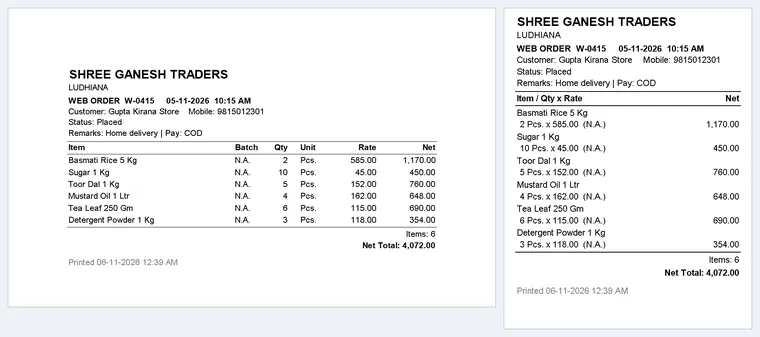
Print Order: the order slip
Print Order (F4) prints the selected order for packing, delivery or the kitchen. Beside the button is the paper choice: Paper: printer's own, Paper: 2 inch (58 mm) or Paper: 3 inch (80 mm).
Web Order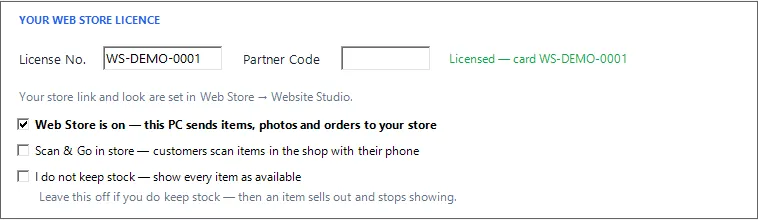
The Web Store's own switch
The Web Store no longer leans on Web Order. Two things switch it on, and both are its own.
Web Store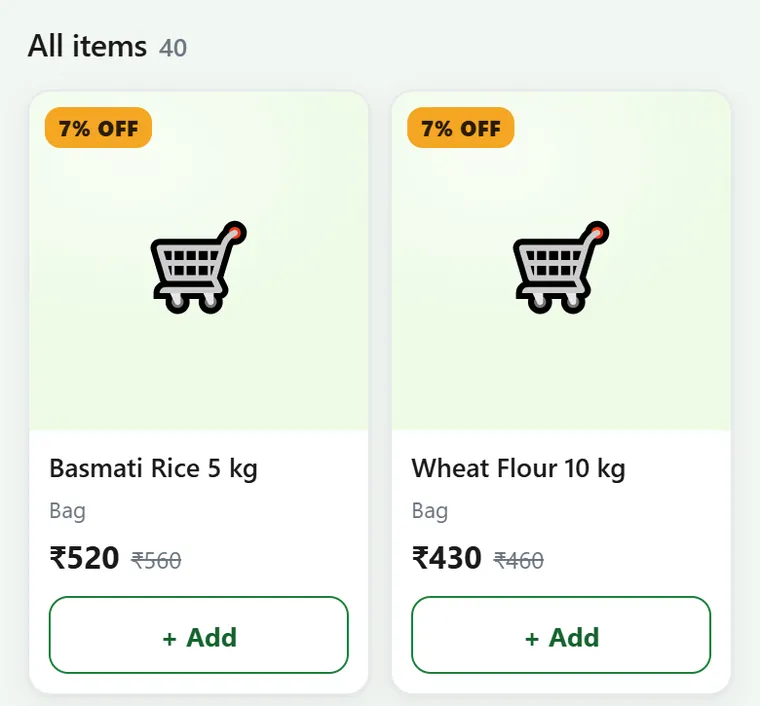
Prices on the website
The website shows the price your customer will pay at the counter. Two server changes in October 2026 make this hold. Nothing needs updating on your PC.
Web Store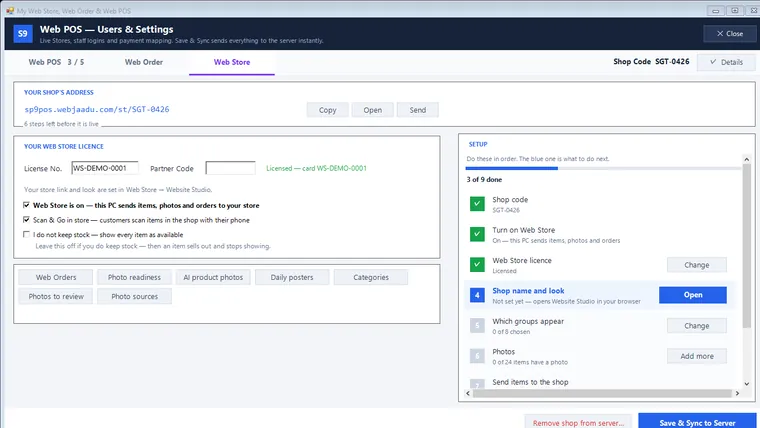
Scan & Go at the head office
A shop with no branches, such as a single store that sells through the Web Store, can now offer Scan & Go at its own counter. The head office has its own row in Self-scan setup. It starts Off.
Scan & Go
The counter's steps in the Speed Plus 9 POS
From version 261030 the Speed Plus 9 POS screen on the shop PC bills Scan & Go carts too. Open Entries → Point of Sale (POS) (Chapter 13). A green Scan & Go (Ctrl+G) button sits on the bottom bar.
Scan & Go New in 2026Your own labels, cess and Tax Free
Two complaints came from early shops: "sometimes it does not scan" and "the phone total and the bill do not match". Both are fixed on the server and in Speed Plus 9 version 261030.
Scan & Go New in 2026Composition Sale and party price lists
A composition dealer pays GST as a small share of turnover and may not charge GST on a sale bill. Such a bill is called a Bill of Supply. Farata handles this with one switch.
Farata app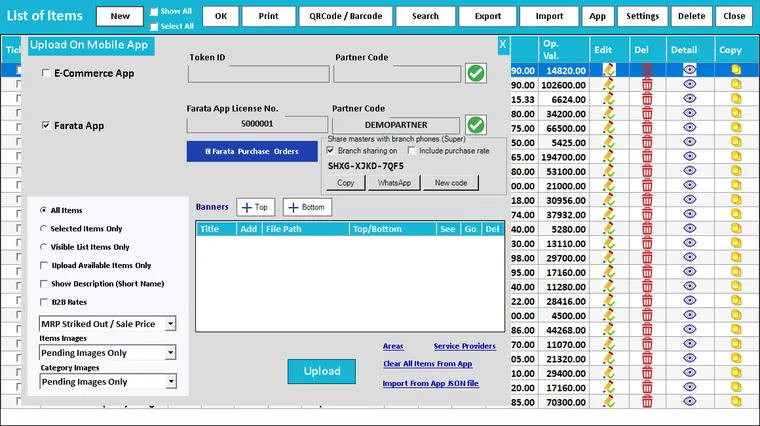
Branch phones: Branch Share and Salesman Inbox
Some shops give a salesman or a small branch its own Farata licence in Standalone mode. That phone keeps its own books, but it still needs the main company's items and parties, and the main company…
Farata app New in 2026Composition Sale and party price lists on the phone
For a shop registered under the GST composition scheme. On the phone open Profile → Entry options, switch on Composition Sale and choose your rate.
Farata & AI import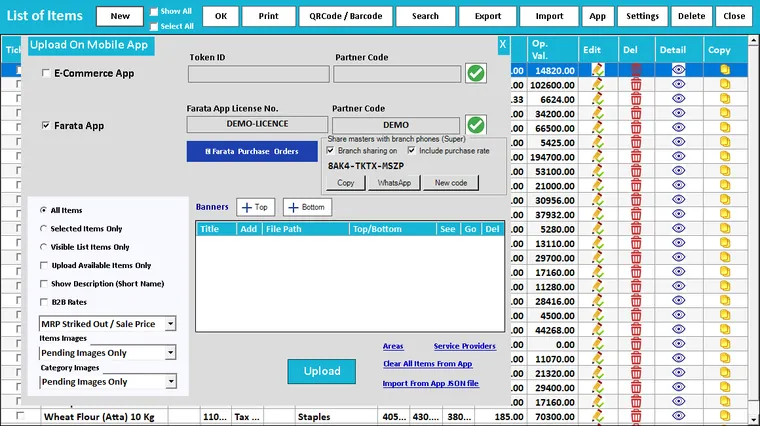
Branch Share and Salesman Sync
Some branches and salesmen work on a phone with its own Farata licence (Standalone), not on the main company's PC. Branch Share gives such a phone the main company's items, batches and parties.
Farata & AI importHotels and restaurants

Automatic food bill discount
Many restaurants give a fixed discount: say 15% on small bills and 20% on big ones, but nothing on drinks. You can now set this once.
Hotels & restaurants
Web Order to KOT
If customers order food from your Web Order link (Chapter 28), the order can go straight to the kitchen as a Delivery or Pick Up KOT. Nobody types it again.
Hotels & restaurants
Automatic food bill discount
Many restaurants run a standing offer such as "15 % off on bills up to Rs 500, 20 % above, not on drinks". Touch KOT can now apply it to every Food Bill by itself, so the cashier does not have to…
Touch KOT
Web Orders and Tablio orders into Touch KOT
Orders do not have to start on the Touch KOT screen. Two other sources become KOTs that you bill here.
Touch KOT New in 2026Printing from the phone: KOT and bill
The waiter's phone prints two things: the KOT for the kitchen, and the bill for the guest. Both need a small thermal printer.
TablioOwner's desk
Today
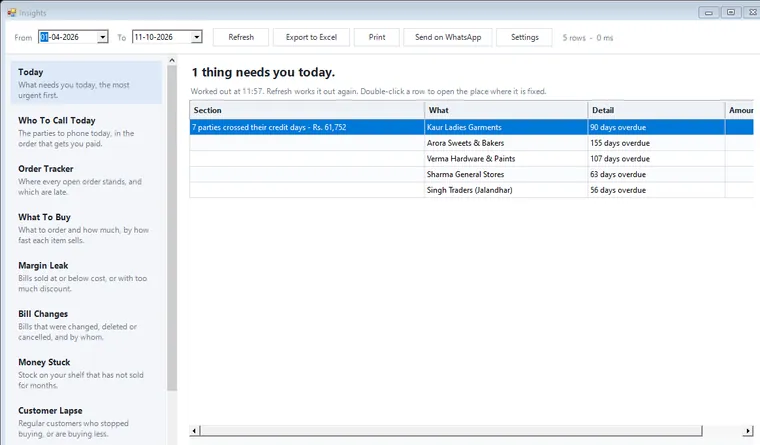
Today is the first entry in the Insights list and opens by default. The headline reads 3 things need you today. or Nothing needs you today.
Owner's desk New in 2026Order Tracker
A customer phones and asks, "Where is my order?" Order Tracker (earlier called "Pending Orders") answers for every open Sale Order.
Owner's desk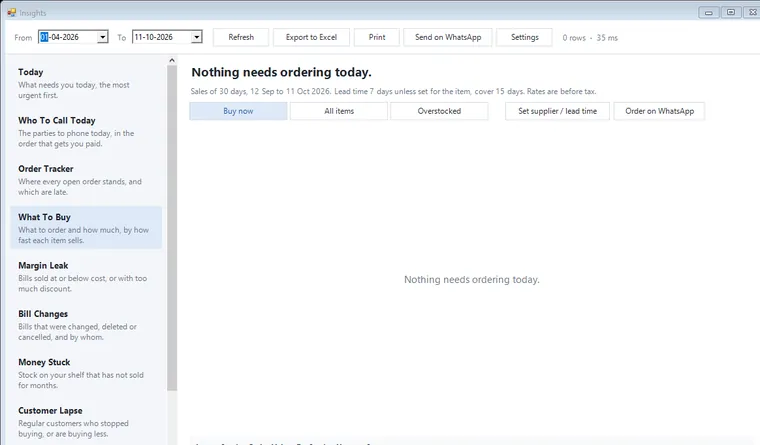
What To Buy
What To Buy (earlier "Stock Running Low") looks at the last 30 days of sales. It works out how fast each item sells, how many days the stock will last, and how much to order so the shelf stays full…
Owner's desk
Bill Changes
Bill Changes is the owner's record of every saved bill that was changed, deleted or cancelled. It shows who did it, when, from which PC, why, and what the bill was before.
Owner's desk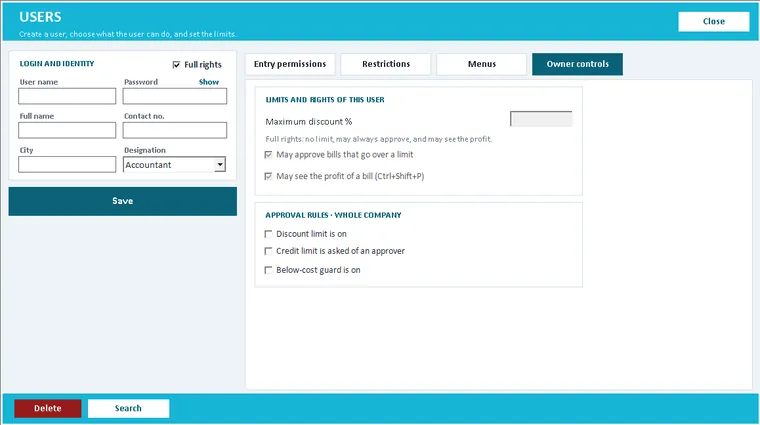
Discount and approval limits on the Users screen
Your staff can no longer give away margin without you knowing. When a Sale, Sale Challan or POS bill crosses a limit, Save shows Approval needed.
Owner's desk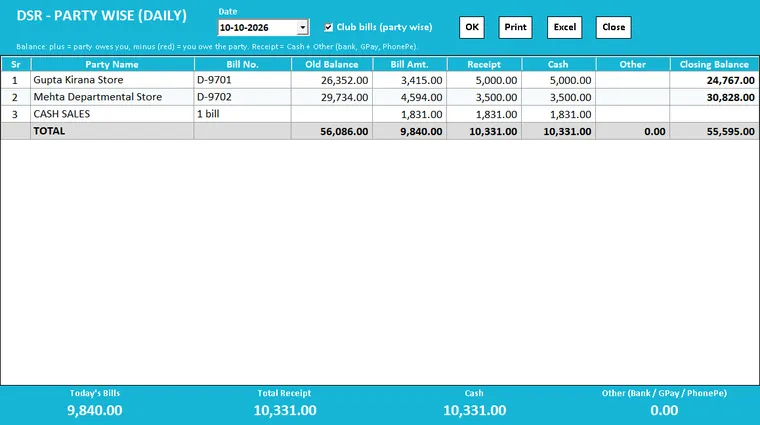
DSR – Party Wise (Daily)
This is the paper DSR register of a wholesaler, for one day: Sale Reports → DSR - Party Wise (Daily). Each line follows Old Balance + Bill Amt. − Receipt − Adj. = Closing Balance.
Owner's desk
Update Item Prices from Vouchers
Your item prices stay current without opening the item master. There are two switches. With the first, a saved Purchase bill's rate becomes the Purchase Price of the batch bought.
Owner's desk New in 2026AI Photo to Bill: how it works
A distributor's bill arrives and someone sits down to type 40 lines. AI Photo to Bill reads the bill from a photo or a PDF: items, quantities, rates, discount, batch, expiry, MRP when it is printed…
Smart tools
Serial numbers from the bill
Mobile phones, TVs, inverters and batteries come with a serial number or IMEI for every piece. Typing 30 of them is slow and one wrong digit causes a warranty fight later.
Smart tools New in 2026One bill from an Excel sheet
Some customers and suppliers send their order or bill as a short Excel sheet. On the SALE BILLS list (Entries → Sale), Import and then the Single Bill tab make one bill from it.
Smart toolsData, settings and help
Checking and repairing a company file
Two key presses on the company screens are meant for the dealer. Take a backup before you use either of them.
Cloud & SQL Server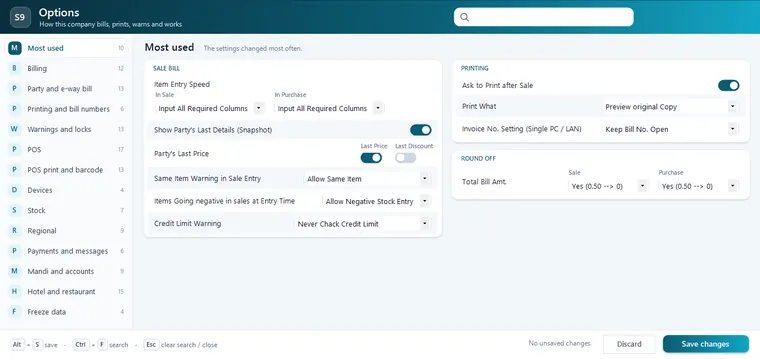
The Options screen and how it works
The screen opens inside the main window. The dark band at the top reads Options and "How this company bills, prints, warns and works".
Settings New in 2026Check for Updates
Speed Plus asks the server once and gives one of these answers:
Help & updates New in 2026The Update Strip: Update Now and Later
You do not have to remember to check. About one minute after the main window opens, and then every four hours, Speed Plus checks quietly in the background. Billing is never held up by it.
Help & updates New in 2026After an Update: What's New Once, and Going Back
The first time the new version opens its main window, a box "What's new in Speed Plus …" lists the changes. It appears once only, even if you close it without reading.
Help & updatesSee Speed Plus 9 on your own data.
Tell us your trade and how you bill today. We will show you the same work in Speed Plus 9, on a call or at your shop.