Speed Plus 9
Billing, stock and accounts on your PC.
Download Speed Plus ↓Make bills, track stock and check customer balances. Connect your branches, phone and online store as your business grows.
Billing, stock and accounts on your PC.
Download Speed Plus ↓Bills, orders and purchase entry on your phone.
Get Farata on Google Play ↗Take table orders and send them to the kitchen.
Get Tablio on Google Play ↗Need help with installation or your licence? Talk to our team →
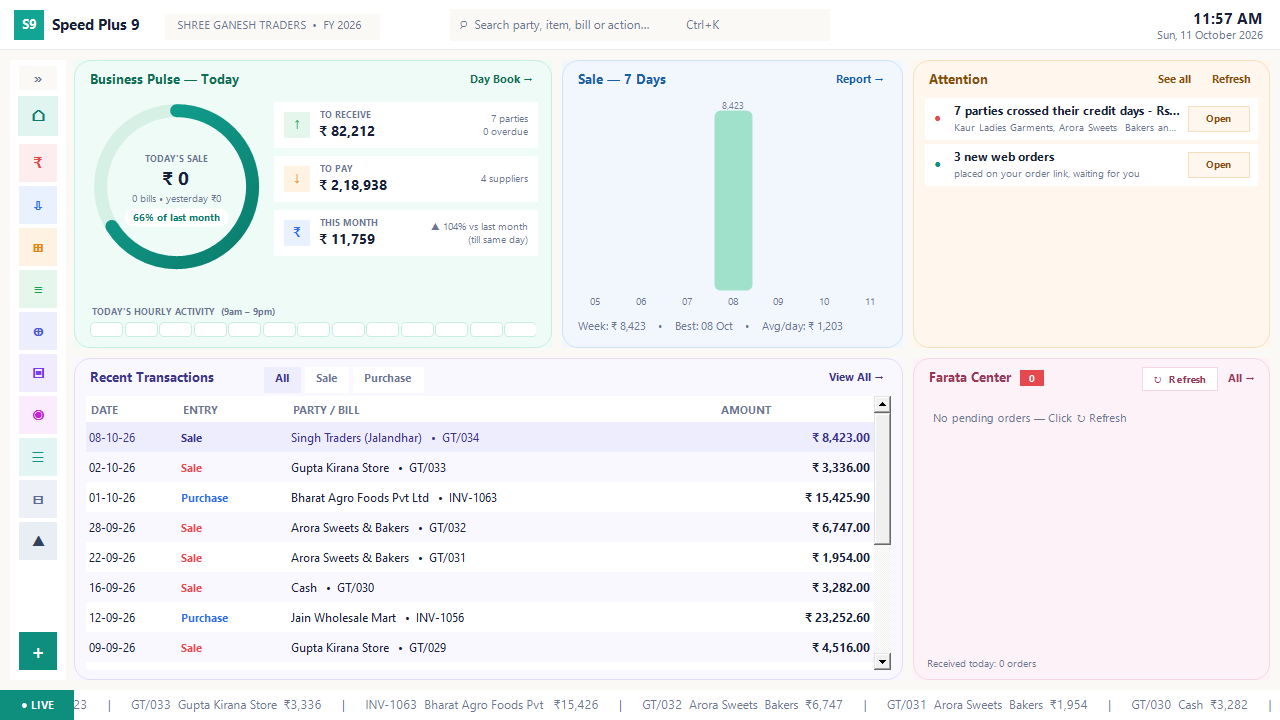 View full size ↗
Follow the numbers into the work behind them: a collection call, a purchase decision, an order to finish or a margin to investigate.
Read the dashboard, then open the Today list to investigate the relevant exception.
Explore the report →02Review overdue balances, promises and the next collection follow-up.
Explore the report →03Compare sales pace, stock and supplier lead time before ordering.
Explore the report →04Inspect below-cost sales, discounts, unusual rates and free quantities.
Explore the report →See what makes Speed Plus useful at the counter, in the office and beyond the shop.
A saved bill updates the linked stock and accounts. Review the sale and customer balance in the same system.
Billing, stock & accounts →Let AI prepare the lines. Match the items and check quantities and rates before saving.
AI purchase entry →Connect Web POS counters to head office. Track branch bills, staff activity and stock transfers.
Connected branches →Give customers an order link or a shop website with photos, categories and a cart.
Your online shop →Review overdue customers, low stock and margin issues, then open the records behind them.
Owner reports →Take orders on the waiter’s phone and follow preparation on the kitchen screen.
Tablio for restaurants →Want to explore one feature after another?
Open the feature explorer →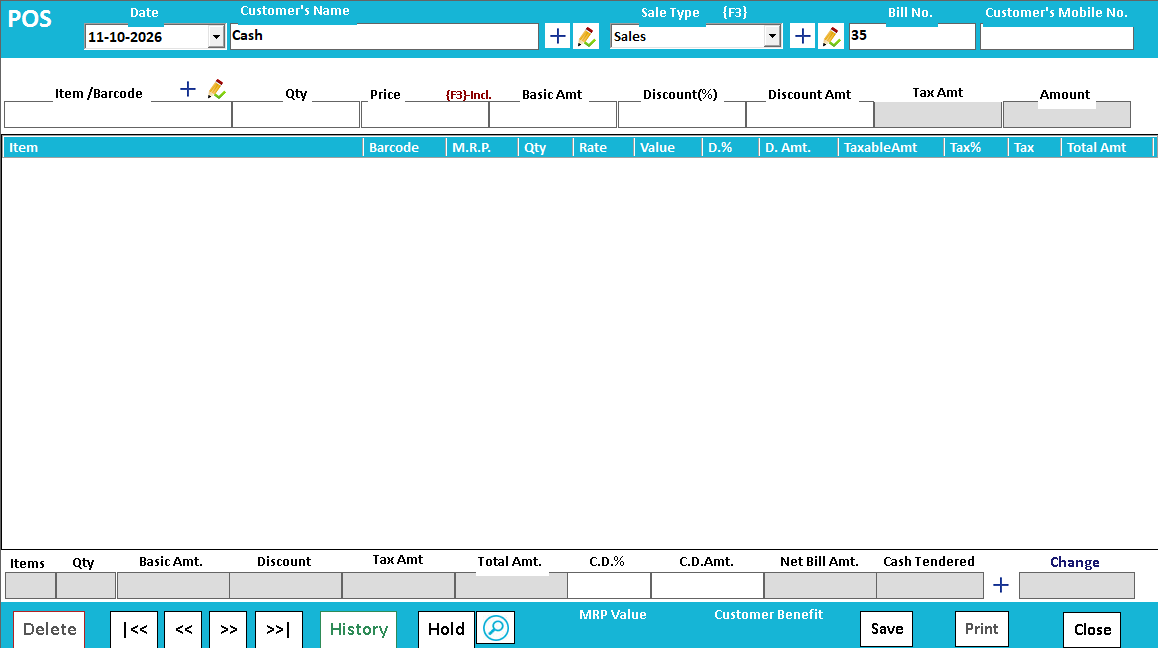 View full size ↗
 View full size ↗
 View full size ↗
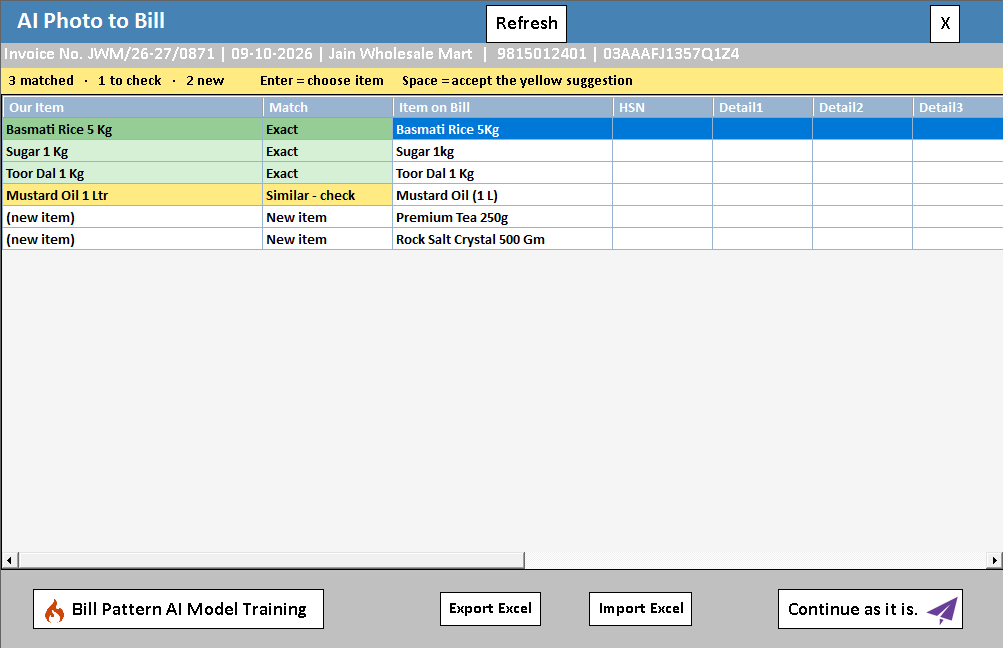
AI reads the supplier bill and prepares the item lines. Check the items, quantities and rates before saving.
Explore AI purchase import →Recognition needs review. Image quality, handwriting and item matching affect the result.
 ▶ Watch the product workflow
Choose a task and follow its connected guides. See how the entries, decisions and results fit together.
From the item on the shelf to the receipt in the customer’s hand.
Try it in your demoBring a sample basket, a barcode and your receipt format.
Understand the review that sits between a bill photo and your purchase records.
Try it in your demoBring one supplier PDF and a few matching item records.
Connect the customer account, invoice, outstanding amount and receipt.
Try it in your demoBring a sample credit invoice and a partial payment.
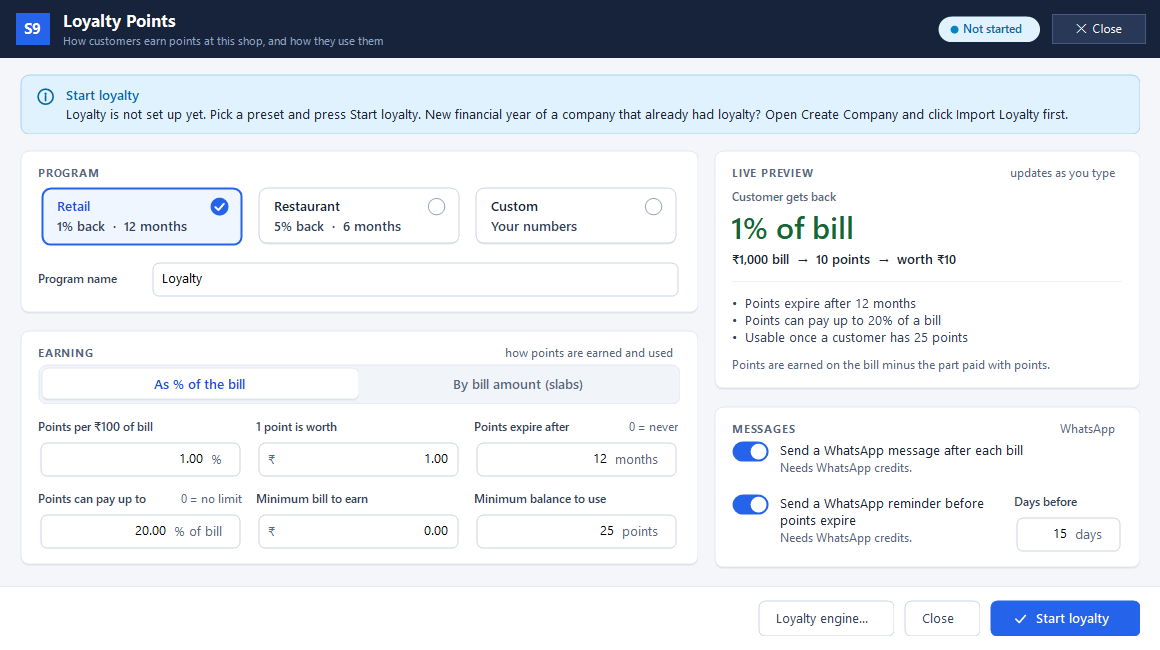
See how a purchase earns points, how redemption works and where the history lives.
Try it in your demoChoose a sample bill amount and the reward rules you want to try.
Follow the service journey across the table, kitchen and billing counter.
Try it in your demoBring a small menu with a portion choice and a preparation note.
Follow an individual device rather than only the total stock of a model.
Try it in your demoBring two sample serial numbers belonging to the same product.
Explore the workflows that matter to your business, then bring a sample transaction to your demo.
POS, barcode checkout and customer payments.
Explore retail workflows →02 / WHOLESALEOrders, purchase records and invoice-wise outstanding.
Explore wholesale workflows →03 / HOTELExplore guest records, stays and hotel billing.
Explore hotel management →04 / RESTAURANTTables, KOT, kitchen display and restaurant billing.
Explore restaurant management →Start with the product that solves your immediate need. Each product has its own setup and licence requirements.
Make bills, take orders and print from your phone. Choose standalone or PC integration.
Explore Farata ↗WBill in a browser at each branch, with records in your head-office company.
Explore Web POS ↗WShare a simple link so customers can send an order.
Explore Web Order ↗WShow products, photos and categories in your own online shop.
Explore Web Store ↗TLet waiters take orders on a phone and send them to the kitchen.
Explore Tablio ↗Speed Plus runs the desktop business. Farata works on your phone. Web POS connects branches. Web Order takes orders through a link, Web Store adds a storefront, and Tablio connects restaurant service.
Compare the product options ↑An item list, bill or workflow you use every day.
See entry, review and the resulting records together.
Discuss the edition, devices, training and connected services you need.
Real product screens, clear steps and matching SolverTeam videos.
See the difference when a branch receives less than you sent.
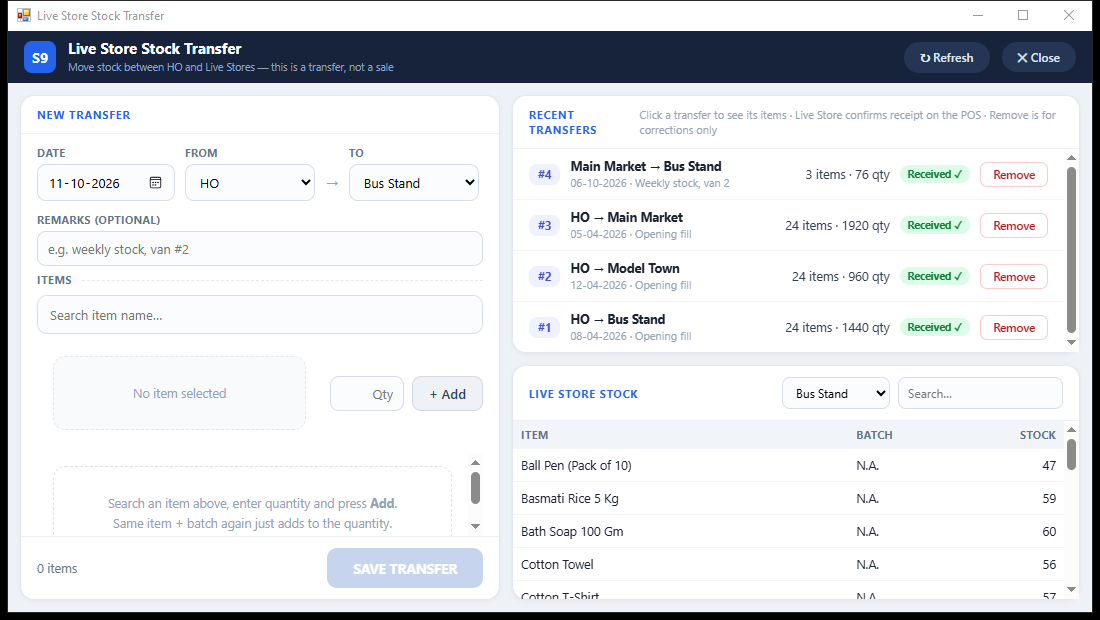 View full size ↗
Set who can change rates, give discounts and edit their own bills.
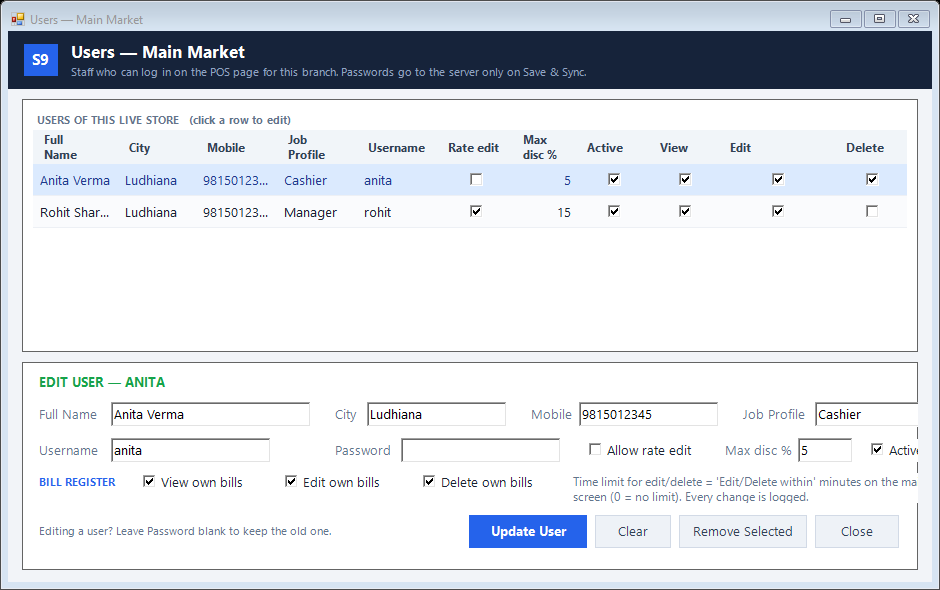 View full size ↗
Give customers clear categories without changing your internal groups.
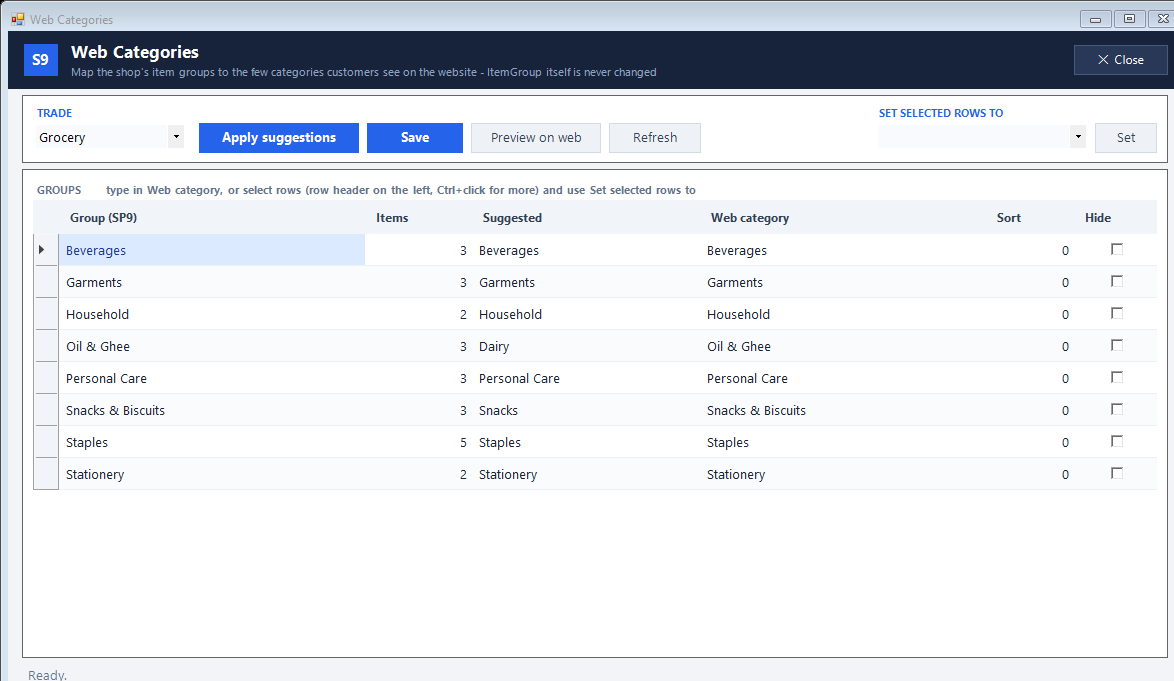 View full size ↗
An online catalogue is easier to maintain when the first version contains a manageable set of well-described products.
Understand who uses each connected product and how branch billing, customer ordering and online catalogues differ.
Permissions should be verified from the account that staff will use.
Billing, inventory, accounting and supported connected workflows. Use the feature explorer to understand each capability and its setup.
Yes. Bring a sample bill, a few representative items and your main questions. The team can show the relevant workflow and discuss your requirements.
This depends on your users, counters and connected products. Confirm the edition, licence, printers, scanners and any hosting or integration requirements during the demo.
Supported import options are available for specific formats. Review a sample file with the team and agree how opening balances, stock and transaction history should be handled.
Open the feature explorer. Its left-side navigation lets you move between feature guides while keeping the full list available.
Request a quotation for your required product, installation, training and any connected services. The team can explain the one-time and recurring components for your setup.
Tell us what you do and the workflow you want to improve. We’ll help you explore the relevant product and setup.
+91 95015 44226Discuss on WhatsApp ↗
