One bill, more than one payment mode.
Record a sale paid through a combination of supported payment modes. Keep the full bill total visible while allocating the amount between cash and other accounts.
Final bill amount
Allocate actual collections
Cash / digital / due records
See the screens behind the workflow.
Real screens from the Speed Plus 9 manual. Open any image to inspect the details.
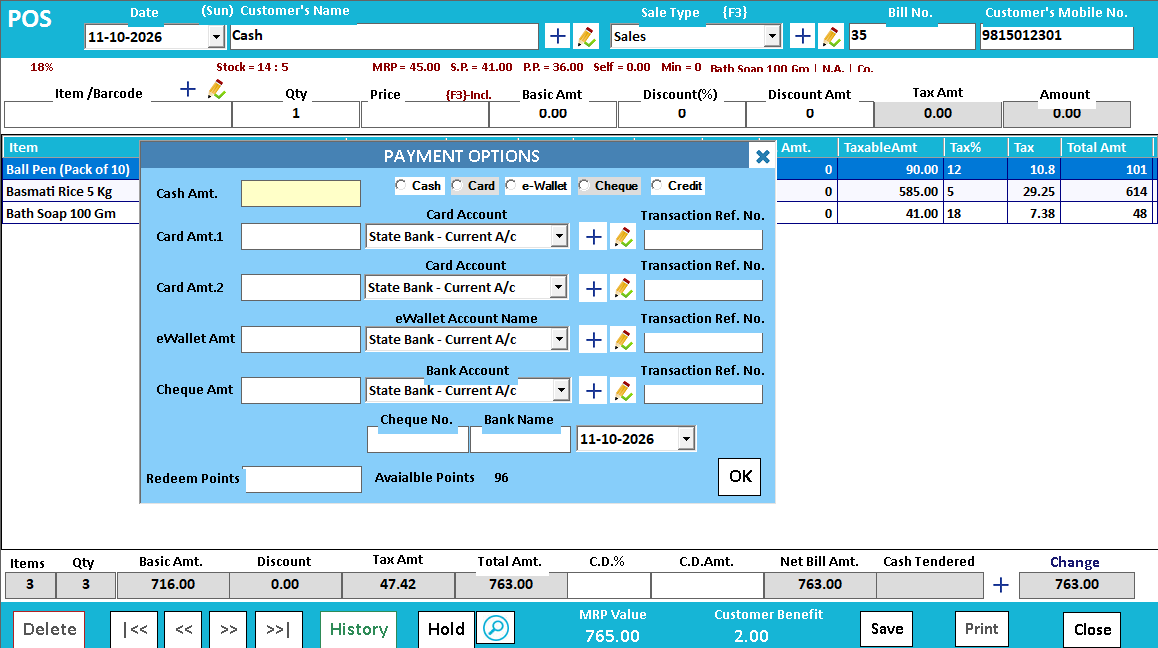 View full size ↗
One sale can be settled through several payment methods.
Split payment describes how a single bill is paid. For example, a customer may pay part in cash and the remainder through UPI. The invoice value remains one sale; the collection is divided between the relevant payment accounts.
Enter the actual amount against each supported method and check that the allocation agrees with the amount being settled. At closing, the cash portion belongs in the cash count while the digital portion needs its own confirmation. Customer credit is an amount still due, not another form of received money.
How to use it.
One bill, more than one payment mode.
- 01
Review the final bill total
- 02
Enter the amount against each supported payment mode
- 03
Check that the allocations equal the payable total
What this looks like in your business.
A customer pays part of a bill in cash and the balance through UPI. Both amounts need to be recorded against the same sale.
Good questions.
Clear answers.
Choose the workflow that fits your business and confirm its setup in a demonstration.
Is split payment the same as splitting a restaurant bill?
No. Split payment divides settlement of one bill between methods. Splitting a bill divides the items or amount into separate customer bills through a supported restaurant workflow.
What setup should I confirm?
Recording UPI is not bank confirmation. Verify receipt of payment independently and confirm mode support in the chosen POS screen.
Run a busy billing counter
From the item on the shelf to the receipt in the customer’s hand.
- 01Item master and searchRead guide →
- 02Barcode checkoutRead guide →
- 03Regular POSRead guide →
- 04Split paymentsYou are here
- 05Custom bill formatsRead guide →
What else can help?
See it with a sample from your business.
Bring a sample bill or item list. We’ll show you the steps and answer your questions.