Review service through the day's records.
Use the available restaurant reports to review sales and other supported operating measures. Compare summary figures with the underlying orders and bills.
Service and billing records
Defined dashboard measures
Review and follow-up decisions
See the screens behind the workflow.
Real screens from the Speed Plus 9 manual. Open any image to inspect the details.
 View full size ↗
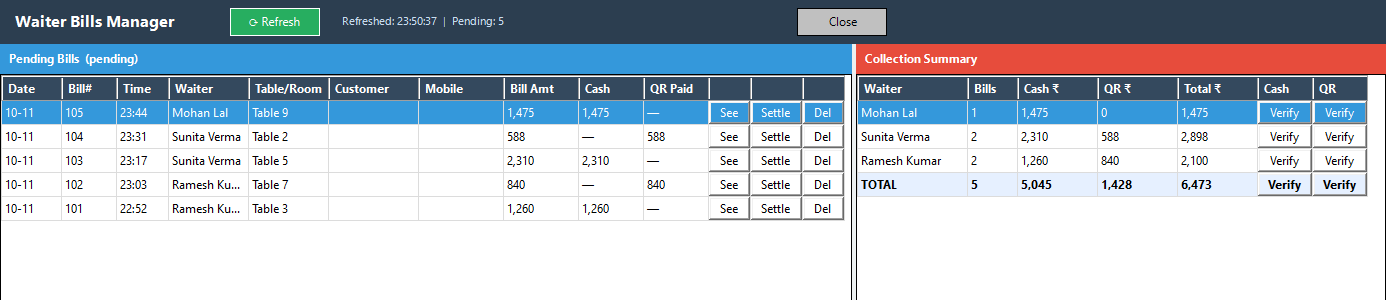
Inspect waiter bills and collection summaries.
Waiter Bills Manager shows pending received bills and a waiter-wise collection summary. These are operational references for the cashier. Use See for inspection and the configured settlement action for posting; confirm the sale type and payment allocation before treating a row as accounted for.
An owner dashboard should help you ask the next useful question.
A restaurant dashboard brings selected operating figures together, but totals become useful only when their period and meaning are clear. Sales, collections, active tables and item performance describe different aspects of the day; one cannot be used as a substitute for another.
Select the relevant restaurant and period, inspect the available measures and open supporting records for unusual figures. Compare collections with payment-method records and use item reports to understand what sold. Check how Tablio transactions are posted into Speed Plus in your configured connection.
How to use it.
Review service through the day's records.
- 01
Select the reporting date or period
- 02
Review the available sales and payment views
- 03
Investigate exceptions against their supporting records
What this looks like in your business.
An owner reviews the closing report and asks staff to explain a difference between recorded cash and the physical count.
Good questions.
Clear answers.
Choose the workflow that fits your business and confirm its setup in a demonstration.
Why can today’s sales differ from cash in the drawer?
Sales can include digital or credit settlement, while the drawer also reflects opening cash and other cash movements. Reconcile the appropriate collection and cash records rather than expecting the sales total to equal physical cash.
What setup should I confirm?
Report availability varies by product and setup. Do not assume live updates without the required connection.
What else can help?
See it with a sample from your business.
Bring a sample bill or item list. We’ll show you the steps and answer your questions.